ERP Integration: A Guide for MENA SMEs


You can usually spot a disconnected business before anyone shows you the systems map. The finance manager is chasing invoice statuses in email. Sales is promising delivery dates from one screen, while inventory is checking another. Accounts closes the week with a spreadsheet export because the ERP doesn't reflect what happened in the CRM or the warehouse tool.
That setup works for a while. Then growth makes it expensive.
For SMEs, distributors, and dealers in the UAE, ERP integration matters because it turns separate systems into one operating picture. It gives finance cleaner data, operations fewer handoffs, and leadership faster answers when cash is tight or stock decisions need to be made quickly.
The Hidden Costs of Disconnected Systems
A finance manager in the UAE often sees the problem before IT does. Receivables in the ERP do not match the invoicing platform. Stock in the warehouse tool looks available, but part of it is already committed to pending orders. Sales asks for a delivery release, while finance is still checking whether the invoice was raised correctly.
Disconnected systems turn routine work into delay. The cost is usually not one dramatic failure. It shows up in slower billing, duplicated checks, disputed numbers at month-end, and decisions made on data that is already old by the time it reaches finance.
Where the cost actually sits
The biggest losses usually come from four places:
- Manual reconciliation: Finance and operations spend hours matching reports instead of fixing the exceptions that affect cash collection.
- Delayed invoicing: Revenue is booked late because order, delivery, and billing data do not move together.
- Duplicate errors: A bad customer record or pricing field gets copied across systems and creates rework in collections, reporting, and customer service.
- Poor cash visibility: Leadership cannot see which sales are ready to invoice, which invoices are awaiting approval, and which receivables are collectible.
For SMEs, distributors, and automotive dealers, that delay has a direct working capital cost. If invoicing slips by a few days every cycle, cash receipts slip with it. If stock data is unreliable, teams buy defensively and carry more inventory than they need. If approvals sit in email, finance closes the month with extra accruals and less confidence in the numbers.
Practical rule: If month-end depends on staff remembering which spreadsheet is current, the issue is integration, not reporting.
A common first step is fixing billing friction. This guide to building an automated system for invoices shows how document flow and approval timing often create more delay than the accounting entry itself. In practice, those delays affect DSO, cash forecasting, and the amount of working capital tied up between sale and collection.
I see the same pattern in regional projects across MENA. Businesses often assume the ERP is the control point, but the actual bottleneck sits in the handoffs between sales, warehouse, finance, and approvals. Once those handoffs are connected, teams work from one current operating view and finance can measure cash impact faster.
For companies comparing operating models across regions, this overview of ERP system integration for Australian businesses is useful for the same reason. It shows the operational cost of disconnected tools in practical terms. The context is different, but the lesson is the same. Hidden labour, slower invoicing, and weaker cash visibility are usually process problems first, then system problems.
What Is ERP Integration Really
Monday starts with a familiar problem. Sales shows one order status, the warehouse shows another, and finance is still waiting for the invoice file. By noon, people are checking three systems and two spreadsheets to work out whether revenue can be recognised and whether cash is likely to arrive this week.
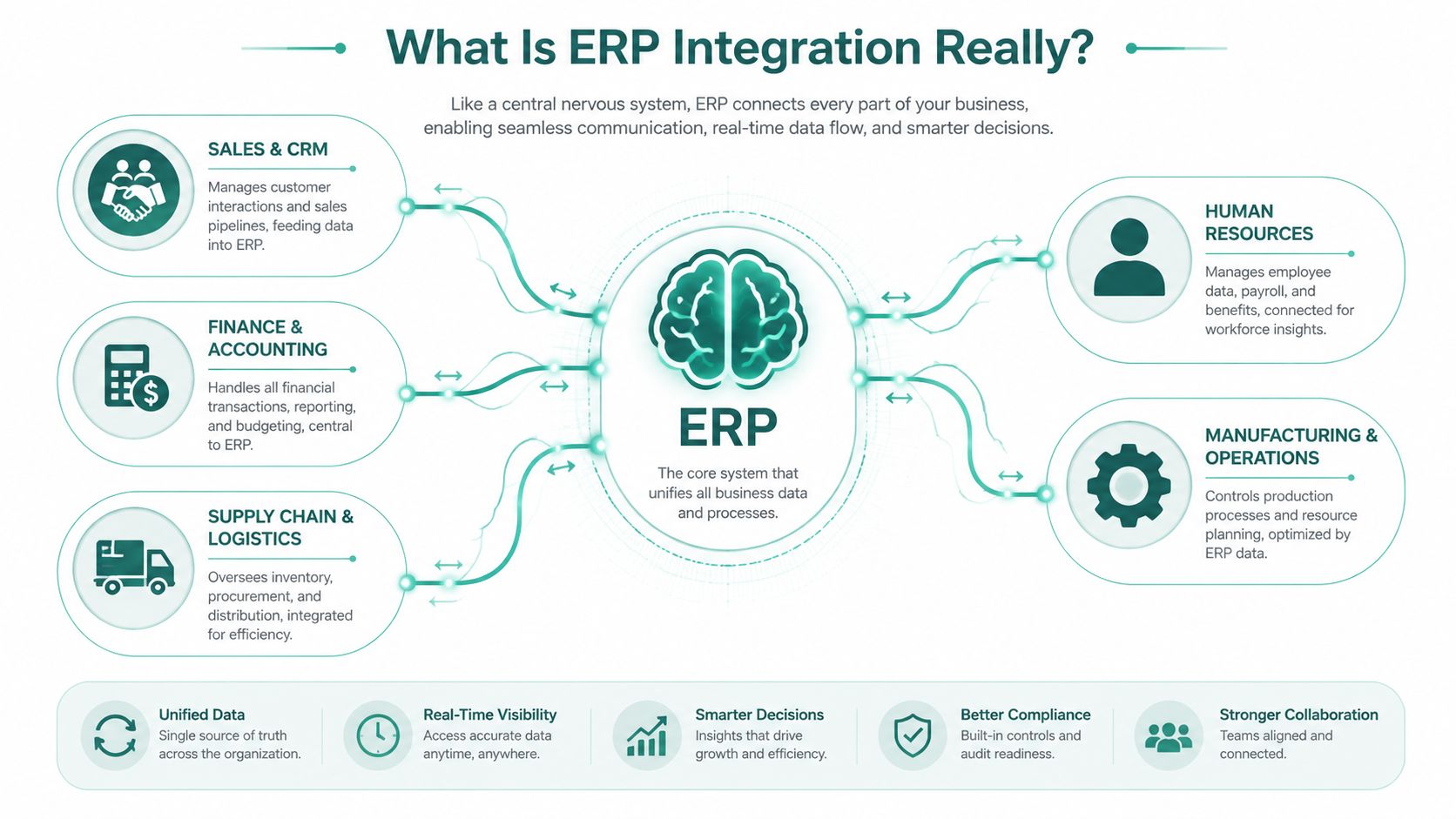
ERP integration fixes that operating gap. It connects your ERP to the systems around it so orders, stock movements, invoices, approvals, payments, and reports move in a structured way instead of being re-entered by hand. In practice, that often means linking the ERP with CRM, warehouse management, procurement, payroll, banking, e-commerce, and finance tools.
What changes once systems are connected
A good integration setup follows business events. A confirmed sales order updates inventory. A goods receipt updates purchasing and finance. An approved invoice moves into collection workflows without someone sending PDFs back and forth.
The result is simple. Teams work from the same current record, and finance spends less time checking whether data is complete.
For SMEs, dealers, and distributors in the UAE and wider MENA region, that has a direct cash impact. If invoice status, stock availability, delivery confirmation, and payment data sit in separate systems, working capital gets tied up in delays and exceptions. If those flows are connected, finance can see bottlenecks earlier, forecast collections with more confidence, and act before issues show up at month-end.
Integration quality also depends on how data moves between systems. Poor field mapping, weak error handling, and inconsistent API structure create support work later. These essential API design practices are useful if your team is reviewing vendors or middleware options with an implementation partner.
What finance should expect from it
A finance manager does not need to care about every technical detail. The useful test is whether integration improves control, speed, and cash visibility.
- Cleaner reporting: Fewer manual touchpoints means fewer mismatches between source transactions and finance reports.
- Faster close: Teams spend less time collecting files, correcting entries, and chasing missing approvals.
- Better control: Exceptions are easier to spot when transactions follow defined rules across systems.
- Stronger cash management: Order completion, invoicing, collections, and stock movement can be reviewed together instead of in fragments.
This is also why ERP and accounting decisions should be made together. If your ERP still sits apart from the finance system, this guide to software for accounting teams in the UAE is a useful companion, because many software projects fail at the handoff between systems, not in the ledger itself.
ERP integration works best when you define the business event first. Order confirmed. Stock allocated. Invoice approved. Payment received. Then map systems around that event.
That keeps the project commercial, not abstract. It also makes ROI easier to measure, especially if the next step is connecting operational data to a platform like Comfi so the business can reduce billing delays, improve collection timing, and get more from the working capital already inside the operation.
Choosing Your Integration Strategy
Most SMEs don't need every possible connection on day one. They need the right structure so the first few integrations don't create a mess that becomes expensive later.
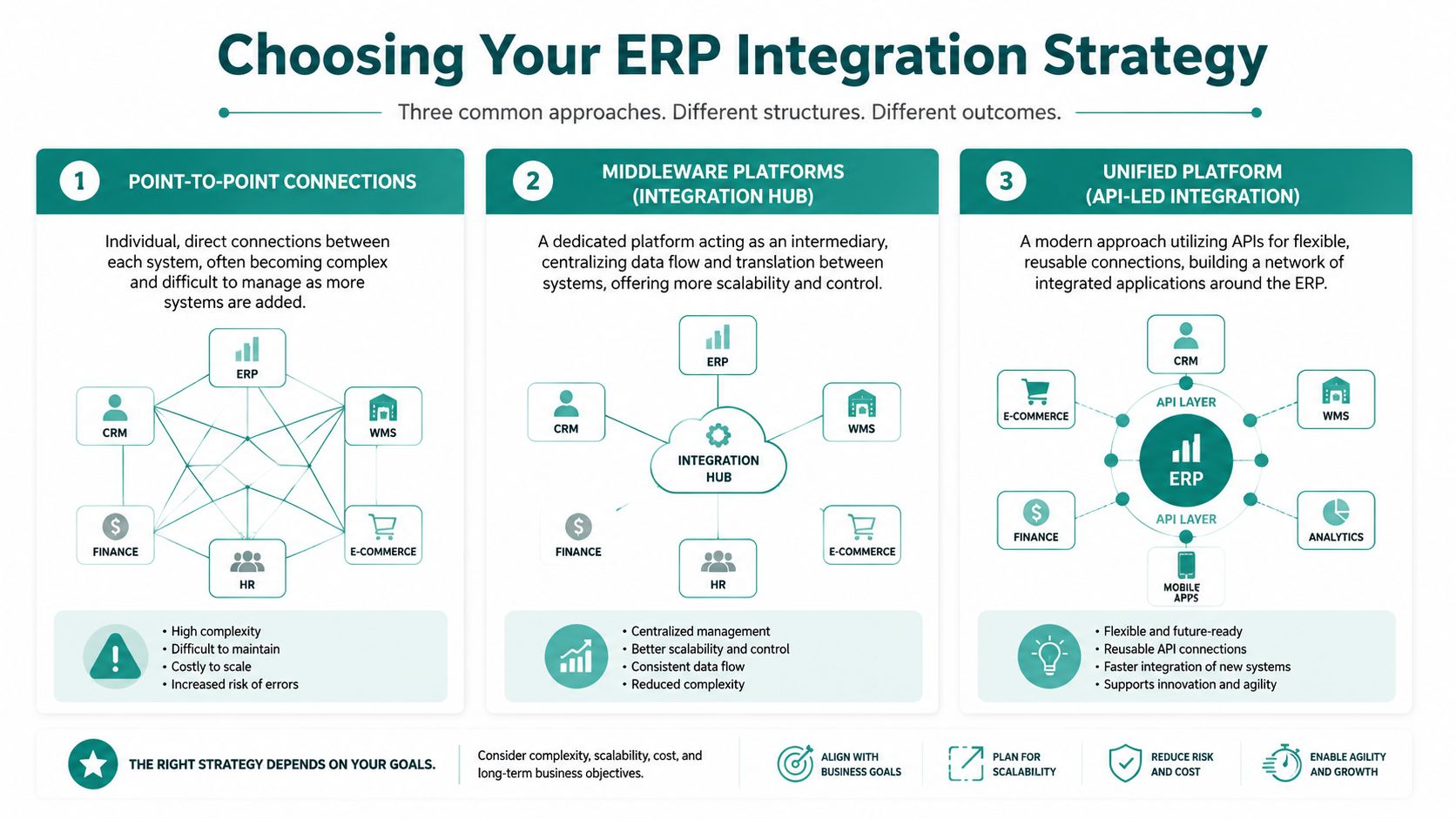
There are three common patterns. Each has a place. Each also has a failure mode.
Point-to-point connections
This is the quickest route when one system needs to talk directly to another.
- Why companies choose it: It can be faster to launch for a single use case.
- What works well: A narrow connection between two stable systems with limited change.
- What goes wrong: Add enough direct links and you get a spider web. Every new tool creates more dependencies, more support effort, and more failure points.
Point-to-point isn't always wrong. It's just easy to outgrow.
Middleware or integration hub
A middleware layer sits between systems and handles translation, routing, and monitoring.
- Why teams like it: It creates one place to manage flows, mappings, and errors.
- Where it helps most: Businesses with multiple systems, different data formats, and ongoing change.
- The trade-off: It adds another platform to manage, which means more design choices and more vendor evaluation.
For many distributors and multi-entity businesses, middleware is where integration starts to become manageable rather than improvised.
API-led integration
This is the strongest long-term model for companies that want flexibility. Systems connect through defined APIs, and the integration logic is built to be reusable rather than custom-coded every time.
Modern integration guidance is clear on one technical point that matters commercially. The best-performing ERP integrations use API-based pipelines that extract only changed records, not full reloads. That incremental method reduces strain on the ERP database and lowers the chance that bad upstream data spreads into finance, stock, or analytics workflows, as explained in this guide to modern ERP integration architecture.
What to ask before you choose
If you're discussing options with IT or a vendor, ask these questions:
- How will this handle growth: If we add another sales channel, subsidiary, or warehouse, do we rebuild or extend?
- How are errors monitored: Can the team see failed records clearly, or will issues hide in logs until month-end?
- How is data quality checked: Is there validation before records reach finance and inventory systems?
- What happens when schemas change: If a field changes in one system, does the whole integration break?
The cheapest integration design is often the one that creates the highest maintenance bill later.
A finance leader doesn't need to write integration logic, but they should insist on clean design. If your team wants a practical technical reference, these essential API design practices help frame what good interfaces should look like when systems need to exchange business-critical data reliably.
In practice, the strongest strategy for an SME is usually incremental. Start with the workflows that create the most manual work or the most cash-flow friction. Build those on a structure you can extend. Don't automate chaos.
ERP Integration Use Cases in the UAE
The most useful way to judge ERP integration is to stop talking about software and look at the transaction path.
In the UAE, value is shifting towards shortening the invoice-to-cash cycle. As the Ministry of Finance advances the national eInvoicing programme, and a large share of SMEs want faster settlement and clearer cash-flow visibility, ERP integrations that connect invoice validation, status updates, and related workflows are becoming more important, as outlined in this overview of ERP integration and the eInvoicing shift.
Automotive dealer workflow
Take an automotive dealer. Stock might sit in a dealer management system, sales activity in a separate CRM, and accounting in the ERP. If those systems aren't connected properly, simple questions become hard to answer.
Is the vehicle still available. Has it been reserved. Has an invoice been raised. Has the documentation cleared internal checks. Can the business restock confidently, or is capital still tied up in vehicles that appear unsold in one system but committed in another?
That's where integration changes the working day. A reservation event can update stock status. A completed sale can move into invoicing and accounting without re-entry. Operations gets cleaner handoffs between showroom, finance, and back office.
For dealers, this matters because inventory is expensive to hold and slow administrative movement delays commercial decisions. The technical integration itself doesn't create cash. What it does is remove uncertainty that keeps inventory and invoices stuck in process longer than they should be.
B2B distributor workflow
Now look at a B2B electronics distributor. Orders may begin in an e-commerce portal or sales platform, while fulfilment sits in warehouse software and invoicing runs through finance. Without ERP integration, the order-to-cash process becomes fragmented.
The sales team says the order is confirmed. The warehouse says it's picking. Finance says the invoice hasn't been generated. Credit control says payment follow-up can't start because the document trail isn't complete.
A connected setup changes that sequence:
- Order entry syncs automatically: Confirmed orders flow into ERP without manual capture.
- Inventory updates move in near real time: Finance and sales stop working from stale stock positions.
- Invoice data stays structured: Status changes can move back into customer-facing or operational systems cleanly.
- Exceptions surface earlier: Missing fields, invalid tax data, or duplicate customer records are easier to catch before they create downstream delays.
In the UAE, the strongest ERP integrations aren't always the broadest ones. They're the ones that remove delay from invoice creation, validation, and follow-up.
Why regional compliance changes the design
UAE businesses also need to think beyond generic system sync. Structured invoice data, approval timing, and auditability matter more when compliance requirements tighten.
That means a useful ERP integration design in the region should support:
- Compliance-ready invoice records: Data should move in a consistent structure, not just as attachments.
- Status visibility: Teams need to know whether an invoice is drafted, validated, sent, disputed, or cleared for the next step.
- Cross-functional access: Finance, operations, and sales should see the same core state without relying on side conversations.
- Reliable triggers: Downstream actions should start from verified transaction events, not manual reminders.
For UAE SMEs, distributors, and automotive businesses, that's the essential business case. Integration reduces handoff delays around the transactions that determine when revenue is recognised and when cash becomes visible.
A Practical Implementation Checklist
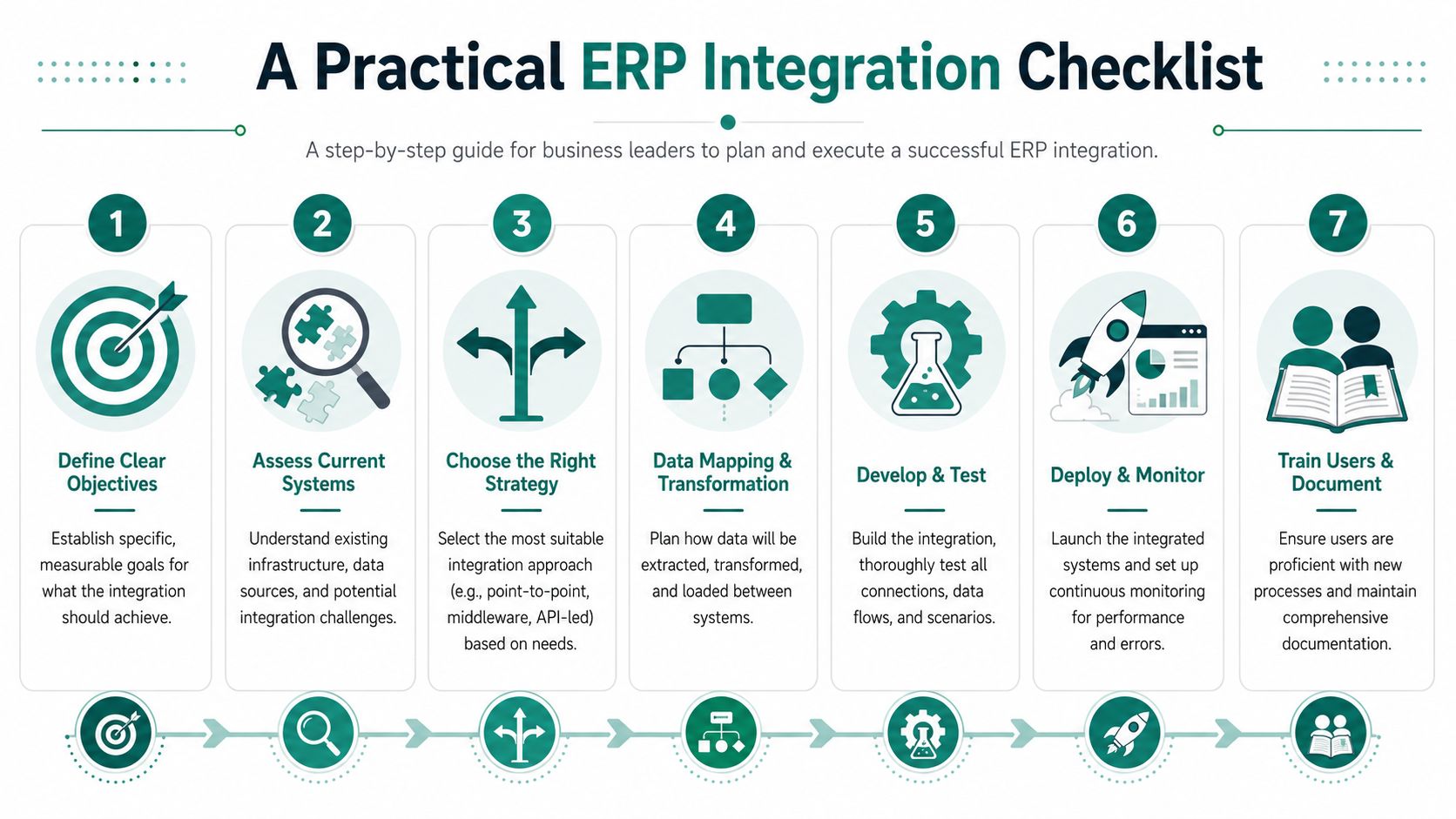
Most ERP integration projects fail for boring reasons. Weak process mapping. Dirty master data. Unclear ownership. Missing security controls. The software itself is often not the main issue.
A good project starts with discipline, not enthusiasm.
The checklist that actually matters
- Define the business event
- Don't start with “we need ERP integration”. Start with something concrete. For example, “we need approved sales orders to update inventory and trigger invoice creation without re-entry”.
- Choose the first workflow carefully
- Pick a process with visible operational pain. Invoice generation, order handoff, stock updates, or receivables status are better starting points than broad, vague ambitions.
- Map data before you map tools
- List the exact records and fields that need to move. Customer ID. SKU. tax details. Invoice status. Approval timestamp. If you skip this, the build team will make assumptions, and finance will discover the mismatch later.
- Clean master data early
- If customer names, payment terms, stock codes, or tax identifiers are inconsistent now, integration will move those errors faster.
Regional controls you shouldn't leave for later
For UAE and wider GCC deployments, integration design must include encryption in transit and role-based access to support regional compliance and cross-border data management, especially where finance, procurement, payroll, and supply chain information flows across multiple entities or jurisdictions, as described in this guide to ERP requirements for secure regional integration.
That requirement affects practical decisions from the start:
- Access design: Decide who can view, approve, edit, and resend transaction data.
- Data movement: Confirm how records travel between cloud systems, on-premise systems, and partner environments.
- Auditability: Make sure approvals and changes can be traced without manual reconstruction.
- Jurisdiction awareness: If data crosses borders, involve compliance stakeholders early, not after go-live.
A secure integration is not the one with the longest vendor checklist. It's the one that limits access, validates data early, and makes exceptions visible.
What to test before go-live
Testing should cover process reality, not only technical success.
- Normal flow: Does a standard transaction move cleanly from source to ERP and onward?
- Exception flow: What happens when mandatory invoice data is missing?
- Duplicate handling: If the same order appears twice, how is it stopped?
- Timing behaviour: Does the sync happen fast enough for the process it supports?
- User behaviour: Can finance and operations understand what failed and why?
Documentation matters too. Not because auditors like it, though they do. It matters because the person who built the first integration won't be the only person supporting it forever.
A stable ERP integration project is one the business can operate after the implementation partner leaves.
Integrating with Comfi to Measure Real ROI
For most UAE SMEs, the key question isn't whether integration is technically possible. It's whether the extra layer is worth the cost and effort.
That's a fair question. Many companies already feel pressure to modernise quickly. In IBM's 2024 CEO study referenced in regional ERP analysis, 74% of UAE CEOs were already using generative AI in operations and 63% were prioritising data and technology modernisation. That makes ROI the only useful standard for a new integration project, as discussed in this perspective on ERP integration and SME business value.
What ROI looks like in practice
A finance leader should evaluate integration against a short list of outcomes:
- Less admin work: Fewer invoices chased across email and spreadsheets.
- Cleaner submission flow: Structured transaction data moves from ERP into the next workflow without repeated manual checks.
- Shorter sales friction: Buyers and suppliers spend less time waiting for back-office coordination.
- Better cash visibility: Teams can act sooner on approved commercial events rather than discovering them late.
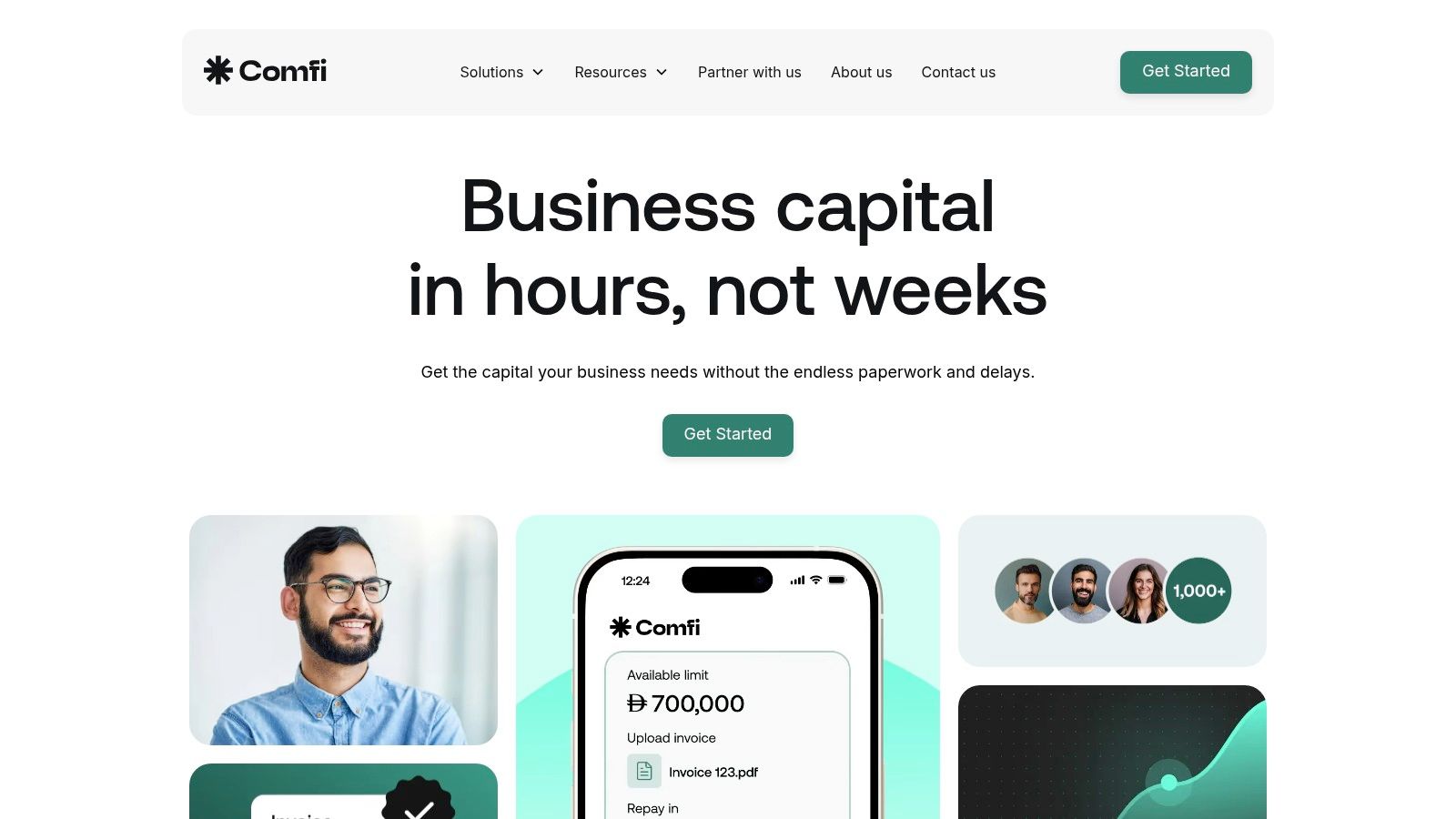
Comfi is a practical example of modern integration done for business outcomes rather than technical theatre. Businesses can connect existing workflows through low-code plugins for common systems or use a developer-friendly API for custom setups. The important point isn't the method. It's the effect. Invoice and transaction data can move from operational systems into a structured digital flow, which reduces manual handling and gives finance teams a clearer path from completed sale to visible cash position.
Where it helps most
This kind of setup is especially useful when the business already has transaction volume but weak coordination between systems.
Think about these cases:
- Electronics distribution: Orders move quickly, but invoice handling and status follow-up still depend on staff intervention.
- Automotive operations: Stock is high-value, admin chains are long, and delays in document flow block commercial decisions.
- Trade-focused SMEs: Finance needs reliable invoice records and status updates without adding another manual process layer.
The value comes from removing delay between a verified business event and the next action. That's how clients can release working capital more predictably. Not because integration itself changes the economics of the transaction, but because it reduces the friction that slows down invoice handling, approvals, and operational follow-through.
A useful example is this Comfi story about driving growth in UAE electronics with RF Technologies. It shows why finance teams care less about integration architecture diagrams and more about whether cleaner workflows help sales move faster and risk stay manageable.
If the integration doesn't remove a manual step that finance already dislikes, it probably won't deliver ROI fast enough.
That's the right standard. Not elegance. Not complexity. Just measurable operational improvement.
If your ERP still sits apart from invoicing, receivables, or order workflows, it's worth looking at how Comfi fits into the process. The strongest integrations don't add another dashboard for the sake of it. They remove admin, improve visibility, and help businesses access working capital from the transactions they're already doing.